
[vc_row][vc_column][vc_column_text]The process explains how you use a free video editor ShotCut to put a background video mockup previously recorded, an image of a blank mug, and a design previously made, together to create a video for your mug design to add to your POD product listing.
How to create a background video mockup for mug designs?
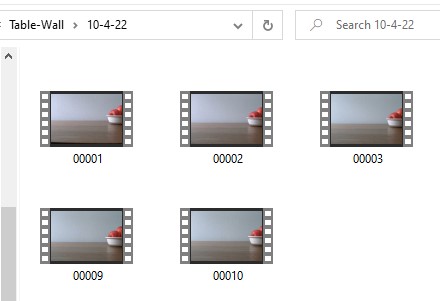
Record 10-15 seconds video of a background to have for the product. That is you background video mockup. Save it as you could reuse it multiple times.
If you want to record a background video for mug designs, record a table or a counter at its edge level.
Put some background elements in the space to record.
Make sure to leave a lot of space for the mug or item that will be put in the video later.
If you have a blank mug, you can record it in the video and put image on it later.
How to shoot a background without the blank product in the video
When you shoot the video mockup, don’t move the camera. When the bank product is not in the shooting but added later, it will follow your camera movement. Therefore, if you move the camera during shooting make the movement right to left very slowly for the product video to look real.
How to make a video mockup with a blank product in the video
Alternatively, put a blank product in the video before recording. During recording, don’t move the blank product. But you can add other elements to the side or add an element to the side of the product where it won’t interfere with the image position. Or pour liquid (water, warm tea) or fruit in the blank mug during the shooting.
For card, record the video from top looking down and have folder in the space been recorded.
You can add a blank card stock on the folder and record. Later you will just add the design on the blank card in the video using ShotCut.
After you record few shots, transfer to your computer, and save them. They are background video mockups or video templates you will use multiples times to create product videos for your Print on Demand product listings.
How to make product image mockup in Inkscape?

Inkscape is a free open-source vector software you can download to your computer and use offline. You can use it to create your designs. You can also use Inkscape to create product image mockups for your print on demand product listings. One of the product images can be used to create product video as well.
We have instructions supported by videos to explain how to create mug image mockup for free.
There is also a free manual in PDF to explain step by step how to create product mockup in Inkscape supported by images under Free Downloads, you could download as a manual to have on hand.
You can put the design on a mug if that is a mug design and use blend mode “multiply” under Layers to blend the design into the product to make it look real. Then you save as PNG.
How to use ShotCut to make product video for your product listing?
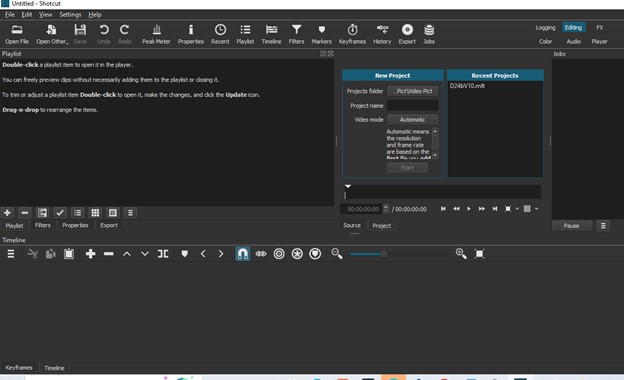
Open shotcut a free video software if you already downloaded to your computer.
Click on playlist.
Drag the video background to use, to the playlist.
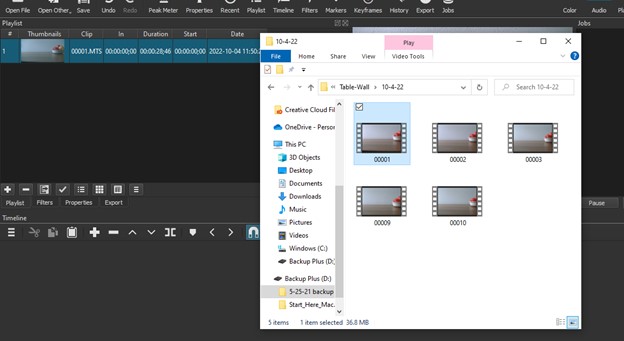
Drag the image to use to the playlist.
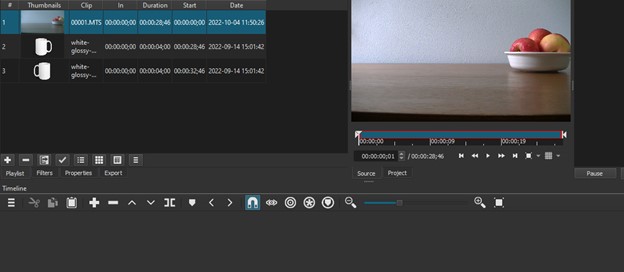
If you are going to put the design on a blank item in Shotcut, drag the blank product like mug as PNG to the playlist.
Drag the design as SVG or PNG to the playlist.
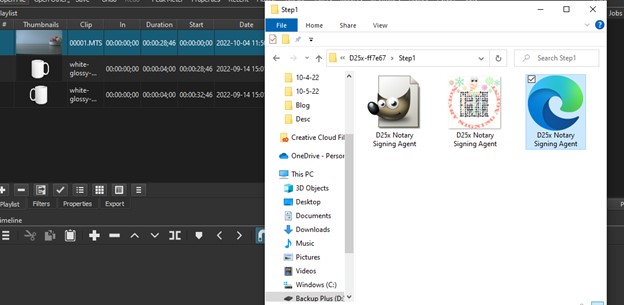
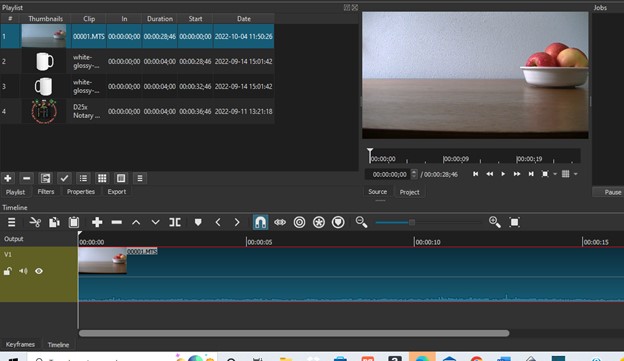
From the playlist, drag the video to the timeline below the playlist.
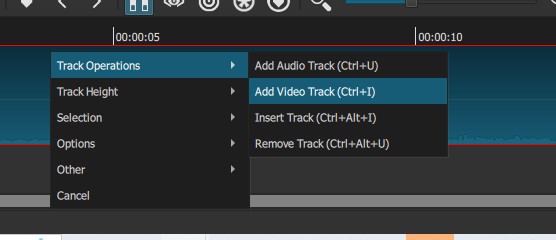
Right click on the timeline and click track operations and add track video.
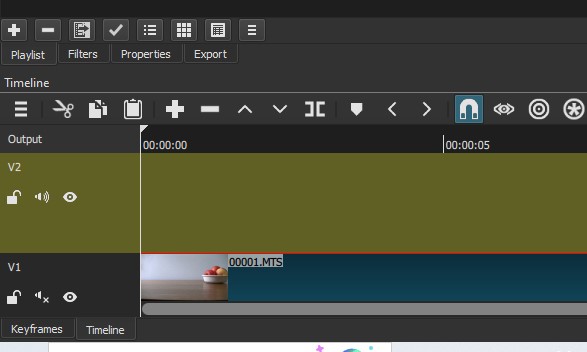
Drag the blank image or blank product down to the new video track that is above the video track where the background video is.
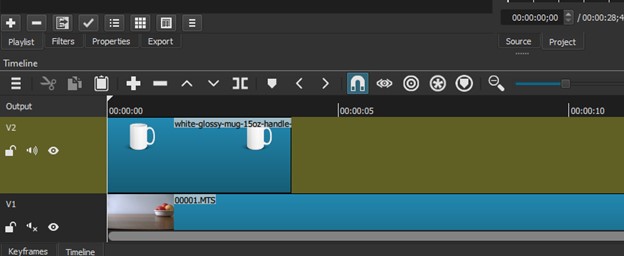
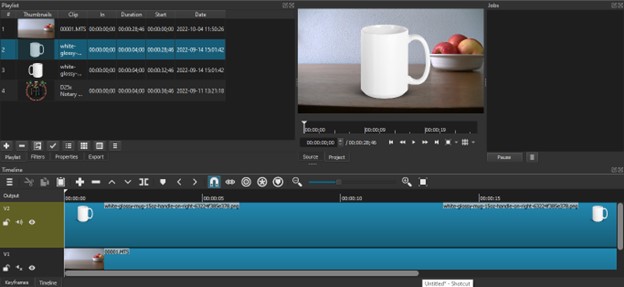
If you want to add a design to a blank mug in Shotcut, you need 3 video tracks in the timeline. The bottom video track will be the background video.
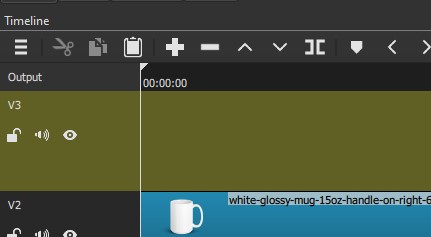
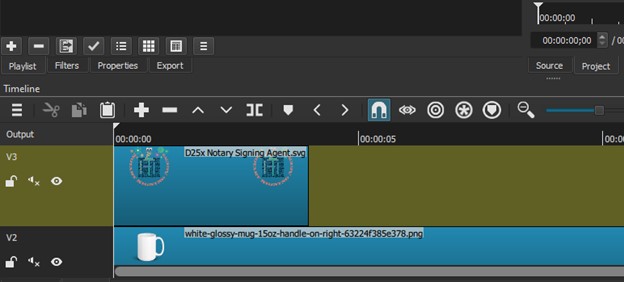
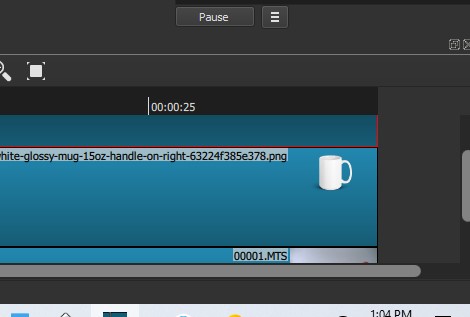
The middle video track will be the mug or blank product as PNG.
The top video track will be the design as SVG or PNG. Therefore, right click in the timeline again and click on track operations and click video track to add the 3rd video track on top. Then drag the design from the playlist to the video track just added. Now you have 3 video tracks in the timeline to work with.
Mute the audio in the left side of all 3 video tracks.
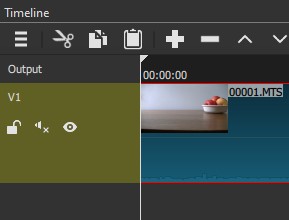
Click on the mug to select.

We want to move it to the left so that it doesn’t touch the background image.
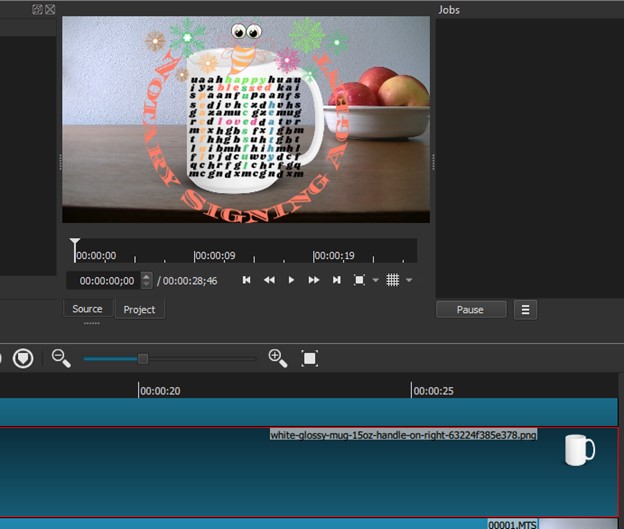
Click on filter on top or next to playlist.
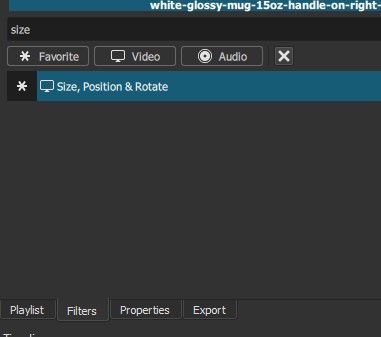
Click on + sign.
Type size or click on video and scroll to “Size, Position, and Rotate” filter.
Click on it.
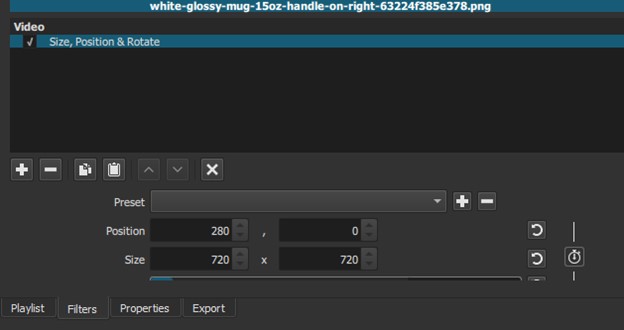
Click to scroll the preset menu.
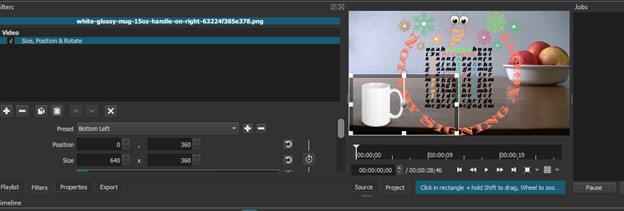
Click on move left.
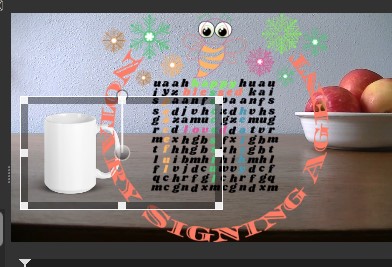
Put the mouse on the ball inside the frame in the preview window and when it is a cross, move to position the object or mug or blank product where in the background you want it.
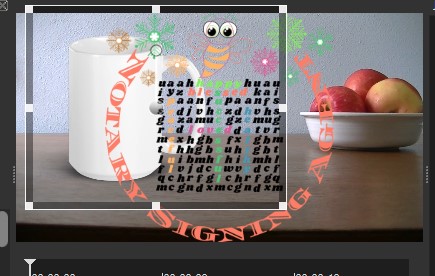
To resize it, put the mouse in the angle or corner of the border around the blank product and drag it.
How to resize your design to fit on the blank product in the video?
To put your design on the blank product, you will use ShotCut Filters “Size, Positions, & Rotate” to reduce the size of the images and move it to fit the blank product. Make sure the design video track is selected before you apply the filter. To resize the design, drag the box around the design from its corner to keep the aspect ratio of the design.
Click on the design video track to select the design.

Click on filter.
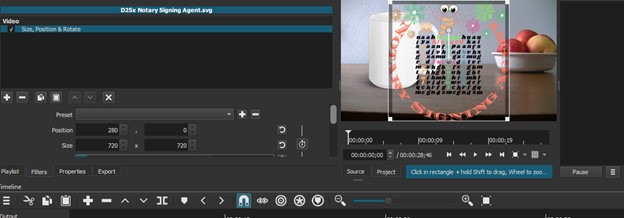
Click +
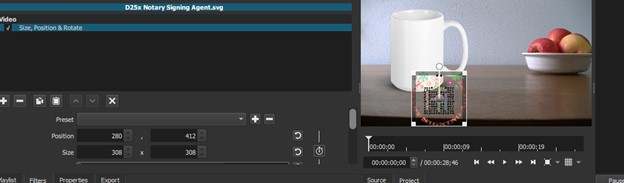
Click on Size, Position & Rotate
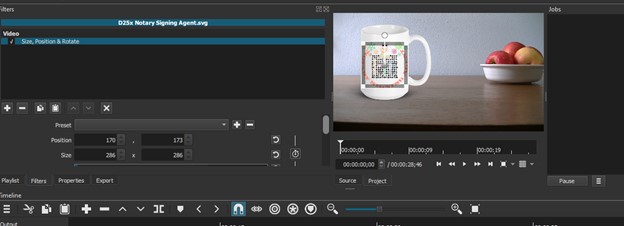
Preset
Put the mouse at the angle of the border the filter put around the design and reduce the size to fit the mug.
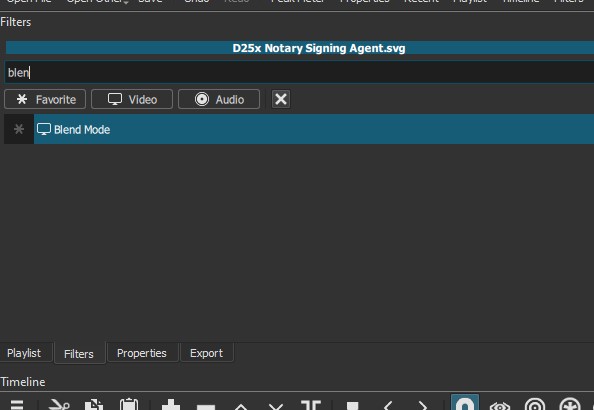
Apply a blend mode to the design. That allows the design to blend in well with the blank product.
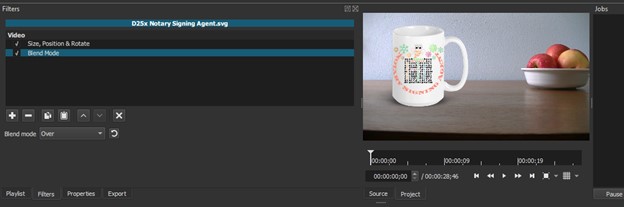
Click on + (plus) sign under filters.
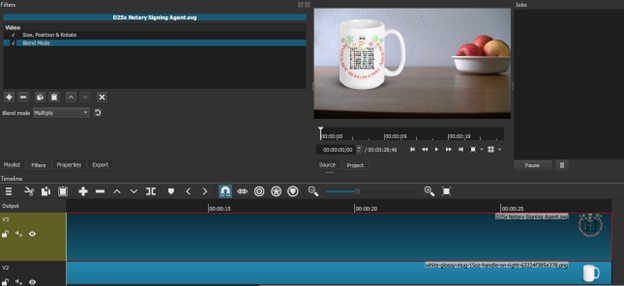
Type blend or scroll to find the blend mode.
Click on blend mode.
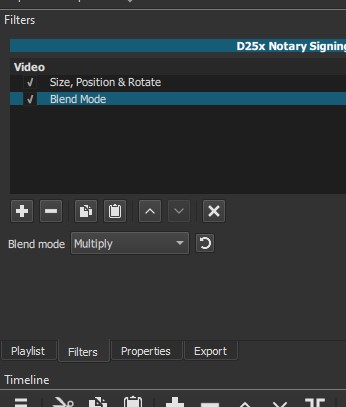
Scroll the drop-down menu and choose Multiply for blend mode while the design video track is still selected.
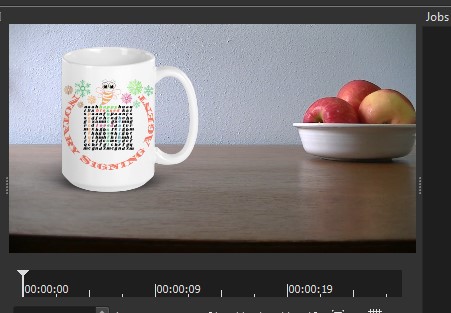
How to select multiple video tracks in Shotcut?
Hold CTRL after you select a video track and click on the rest of video tracks to select them as well.
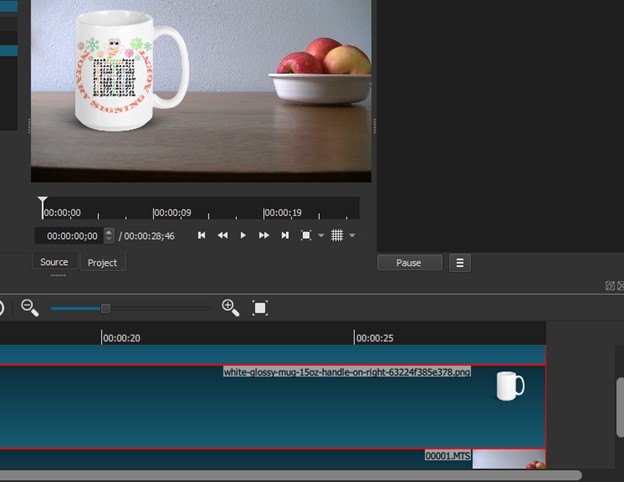
How to save a video created or edited in Shotcut?
When you are done with the video, click on Export button in the top bar in Shotcut. Make sure the timeline is selected from the Export drop down menu. Click on Export File to select the folder where you want to save your video. Name your video file and save it.
Click on Export.
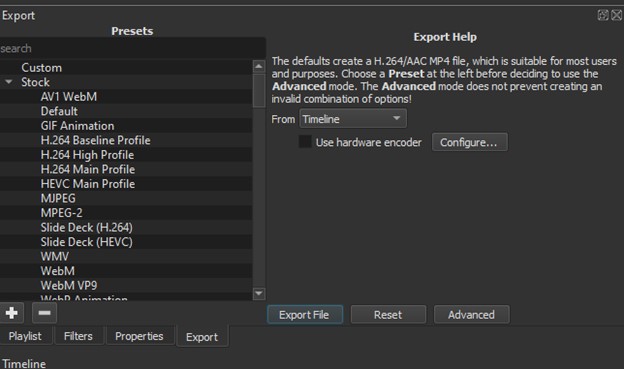
Make sure in the export window the timeline is selected.
Click on Export File.
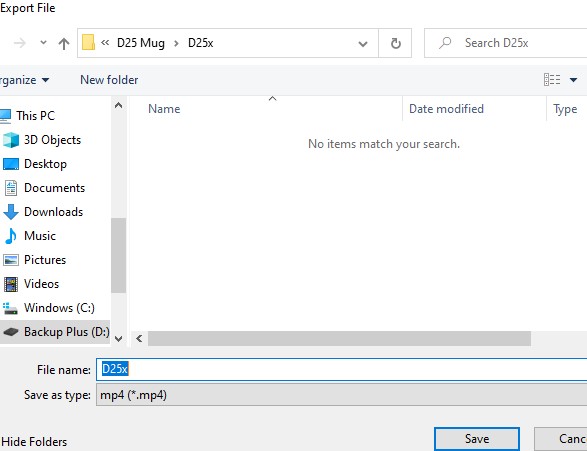
Choose the folder where you want to save the video. Name the video file and save.
The video by default will save as MP4.
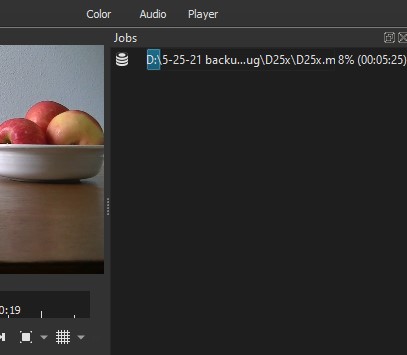
In the Jobs widow in the far-right side of the Shocut, you will see the progress while the video is been saved.
When it is done exporting, you will see the mp4 format at the end of the file name.
Open the folder where the video is saved. Play the video after it is saved to see if you like it.
You just created a video product for your print on demand product listing.
When you list your product on Etsy, eBay, you can upload your product video to the listing.
When you add the product listing to your own Woo Commerce website created using Word Press, upload the product video to your business YouTube Channel assuming you have one for your business, and add the video link to your product listing.
There is a free manual in PDF with images under Free Downloads to explain step by step how to create a mug video mockup for free.
6-How to make a mug video mockup for free?
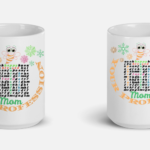
This video explains the 3rd option where you use a video background, a blank product, and a design, and create a video mockup in Shocut for free.
[/vc_column_text][/vc_column][/vc_row][vc_row css=”.vc_custom_1669116801402{margin-top: 10px !important;margin-bottom: 10px !important;}”][vc_column][vc_row_inner][vc_column_inner][vc_video link=”https://youtu.be/nQYH9LToMJA” el_width=”60″ el_aspect=”235″][/vc_column_inner][/vc_row_inner][/vc_column][/vc_row][vc_row css=”.vc_custom_1669116801402{margin-top: 10px !important;margin-bottom: 10px !important;}”][vc_column][vc_row_inner][vc_column_inner][vc_cta h2=”Manage Your Business Yourself” h4=”Previous articles in this category” txt_align=”center” add_button=”right” btn_title=”Manage Your Business Yourself” btn_link=”url:https%3A%2F%2Fninasoap.com%2Fmanage-your-business-yourself%2F|title:Manage%20Your%20Business%20Yourself||”]
Tips and tools to create, run, and manage your business successfully.
[/vc_cta][/vc_column_inner][/vc_row_inner][/vc_column][/vc_row][vc_row css=”.vc_custom_1669116801402{margin-top: 10px !important;margin-bottom: 10px !important;}”][vc_column][vc_row_inner][vc_column_inner][vc_btn title=”How to make a mug video mockup for Free-Free Download” style=”custom” custom_background=”#90ee90″ custom_text=”#000000″ align=”left” link=”url:https%3A%2F%2Fninasoap.com%2Ffree-downloads%2Fhow-to-make-a-mug-video-mockup-for-free%2F|title:How%20to%20make%20a%20mug%20video%20mockup%20for%20Free|target:%20_blank|”][/vc_column_inner][/vc_row_inner][/vc_column][/vc_row][vc_row css=”.vc_custom_1669116801402{margin-top: 10px !important;margin-bottom: 10px !important;}”][vc_column][vc_row_inner][vc_column_inner][vc_wp_text]
[/vc_wp_text][/vc_column_inner][/vc_row_inner][/vc_column][/vc_row][vc_row css=”.vc_custom_1669116801402{margin-top: 10px !important;margin-bottom: 10px !important;}”][vc_column][vc_row_inner][vc_column_inner][cr_posts_list items=”5″ show_category=”no” show_comments=”no” show_date=”no” include_categ=”” include=”8512,8755,8932,8989,9053″ author_select=”” list_style=”custom” title_color=”#000000″ excerpt_color=”#000000″][/vc_column_inner][/vc_row_inner][/vc_column][/vc_row][vc_row css=”.vc_custom_1669116801402{margin-top: 10px !important;margin-bottom: 10px !important;}”][vc_column][vc_row_inner][vc_column_inner][vc_btn title=”How to make product images from your own mockups-Free Manual” style=”custom” custom_background=”#90ee90″ custom_text=”#000000″ align=”left” link=”url:https%3A%2F%2Fninasoap.com%2Ffree-downloads%2Fhow-to-make-product-images-from-your-own-mockups%2F|title:How%20to%20make%20product%20images%20from%20your%20own%20mockups|target:%20_blank|”][/vc_column_inner][/vc_row_inner][/vc_column][/vc_row][vc_row css=”.vc_custom_1669116801402{margin-top: 10px !important;margin-bottom: 10px !important;}”][vc_column][vc_row_inner][vc_column_inner][vc_wp_text]
Disclaimer:
“I am not an attorney to practice law. I am not allowed to draft legal documents, give advice on legal matters including immigration, or charge a fee for these activities.” Our articles are informative and based on our knowledge and experience. They are for educational purpose only. Use them at your own discretion.
Affiliate Links Disclaimer:
Our articles contain affiliate links. When you click on one of our affiliate links and make a purchase, we will receive a commission. We thank you very much for your support!
Please Find About our Products and Links Below
Free Download
Would you please check the “Free Download” section on our website for budget spreadsheet, budget planner PDF, tax forms, motivational quotes, checklists, and more for you do download. You don’t need to subscribe to access them. We would like to have you in our community where we interact and encourage each other to reach our goals. We invite you to join our email list, but it is not required to download from Free downloads.
https://ninasoap.com/free-downloads/
Our Objectives
At Nina’s Soap (Liberman Consulting L.L.C.), you would find information to live a quality life within budget and increase your net worth. Topics covered include personal finance, investment, business management, cooking from scratch and growing some vegetables and fruit to save money and eat healthy.
For more, would you please check our blog:
Contact Information: care@ninasoap.com
You Tube Channel:
Are you a visual type person? We got you covered! You can watch video contents including how to file your business tax returns yourself at:
https://www.youtube.com/c/LibermanConsultingLLC
Liberman Consulting L.L.C. Podcast:
Do you like to listen to podcast while you are busy working to maximize your time and learn at the same time? You can listen to contents including how to save money and create multiple sources of income at:
https://www.buzzsprout.com/1585738/
Join Us for Free
You are invited to join us where you could ask questions, stay motivated and work toward reaching your financial goals.

How to Find Previous Articles
To make it easy to navigate our website, would you please check the side bar? Under “Post Archives”, are our “categories”. The links to our prior articles are saved under their appropriate categories. Would you please click on any category under “Post Archives” to read the titles of previous articles and click on the link of your interest to open the article.
Welcome to Our Financial Success Group!
To learn more tips on how to live below your income without sacrificing the quality of your life and start building wealth, would you please join our community for FREE by subscribing here:
https://ninasoap.com/membership-join/
Our Online Stores
Welcome to Nina’s Soap our Natural Products Store
Our Online Stores
Welcome to Nina’s Soap our Natural Products Store
Natural soaps are handmade with quality grade natural unrefined oils and butters, food grade sodium hydroxide, and herbs grown in our garden without pesticide or chemical fertilizer—- no additives, no fragrance, no dye.
Towels, washcloths, and cloth napkins are natural and eco-friendly alternatives of paper towels, paper napkins, and tissue papers for you to enjoy in the comfort of your home while saving money and the environment.
Best Seller: Nina’s Soap Flour Sack Individual Hand Towel – Set of 5: Small size cloth napkins to use as individual hand towels in the bathroom instead of paper towels or as napkin in the kitchen for family dinners:
https://ninassoap.com/product/ninas-soap-flour-sack-hand-towel-set-of-5/
Welcome to Liber Label our Apparel Store
Customs design clothing, home décor, accessories, and stationery with motivational quotes to lift your mood every day.
Business planner inserts, business tax checklist, to do list, many printable of our digital downloads can be purchased here and shipped directly to your door.
Welcome to LiberOutlet.com our Resale Store
New and used office supplies, toys, small kitchen appliances, household products, packaging supplies at a bargain price.
Welcome to Liberdownload.com, Digital Products Store
Budget and Monthly Expense Tracker, Checklist to create your online store, Inventory and Sales Excel Template…tools you need to manage your money, start and run your business successfully, and reach your financial success.
If you are a Sole Proprietor, a Limited Liability Company (LLC), an S Corporation, or an LLC taxed as an S Corporation, articles and videos on our channel would be helpful to file your business tax returns. If you need more help and would like to meet with us, would you check if our Group meeting session is the best fit for you.
Business Consulting Session: Virtual Group Meeting for new Business Owners that need help organizing their business income and expenses and be able to file business taxes themselves:
Small Business Group Session-Quarter 1:
https://liberdownload.com/downloads/small-business-group-session-quarter-1/
Small Business Group Session-Quarter 2:
https://liberdownload.com/downloads/small-business-group-session-quarter-2/
Small Business Group Session-Quarter 3:
https://liberdownload.com/downloads/small-business-group-session-quarter-3/
Small Business Group Session-Quarter 4:
https://liberdownload.com/downloads/small-business-group-session-quarter-4/
Affiliate Links:
Bluehost: We host our websites at Bluehost and like their service. They take the time over the phone to help solve website issues
https://www.bluehost.com/track/ninasoap/
Please Register for Free
Registration
[/vc_wp_text][/vc_column_inner][/vc_row_inner][/vc_column][/vc_row]